Falco Software Company


Russian version

 
Falco Icon Studio

     To design high-detail color icons, you need the right tool for the job. Falco software company presents a comfortable icon creation tool - Falco Icon Studio (Icon Maker, Icon Editor) creates, edits and manages icons and other small images. It handles popular file formats used to store multiple icons of various sizes and all possible color systems. Now available for purchase, the tool you need to create graphically rich icons! Free trial version also available.

     Falco Icon Studio (Icon Maker, Icon Editor) supports a comprehensive environment for professional designers and novice graphics producers to create unique icons for software products, application programs, games and anything else you need!

     Manage, export, edit and create your own eye-catching, professional-grade Windows icons with Falco Icon Studio with ease. This tool also includes other features, that allow the user to export, edit, and manage icons and other small images. It allows loading from DLL/EXE, BMP, GIF, PNG, JPG, ICO, CUR, ANI files; saves output icons in JPG, GIF, PNG, BMP, ICO, CUR and ANI formats, supports unlimited UNDO/REDO function, can Copy/Paste in Multiple Windows, paste from MS Paint and other image editors. Supports other effects such as, Pencil, Line, Text, Rectangle, Ellipse, Filled Rectangle, Filled Ellipse, Fill Tool, Selection Tool and more. This Icon editing studio also allows adding different effects including, Rotation, Flips, Shifts, Contrast, Brightness and much more to the icons.

Key Features for Falco Icon Studio (Icon Maker, Icon Editor):

1. Loading from DLL/EXE, BMP, GIF(Animated), PNG, JPG, ICO, CUR, ANI, TARGA, PSD(Photoshop), PCD(Kodak), TIFF, ICL(Icon Library) files.
2. Saving in JPG, GIF (Animated), PNG, BMP, ICO, CUR, ANI, TARGA, TIFF, ICL (Icon Library) formats.
3. Unlimited UNDO/REDO.
4. Copy/Paste in Multiple Windows.
5. Paste from others Image Editors like MS Paint, etc.
6. Pencil, Line, Text, Rectangle, Spray, Ellipse, Filled Rectangle, Filled Ellipse, Fill Tool, Selection Tool, Color Selection Tool, Lasso Selection Tool, Hue Selection Tool, Blur, Eraser.
7. Add/Remove Icons. The Adding presents in Custom Size with the different Color Depth (Mono-Chrome, 16 Colors, 256 Colors, True Color, 32 Bits).
8. Effects: Rotates, Flips, Shifts, Contrast, Brightness, Invert Colors, Blur, Gray-Scale, HLS Adjustment, Sharpen, Emboss, Contour, Contrast Filter, High Contrast Filter, Prewitt, Sobel, Laplas.
9. Any Size up to and including 2048 x 2048.
10. BMP & PNG 32 bits supporting with transparency.
11. MS Vista is Supported.
12. Multi-file opening.
13. Webcam and scanner supported.
14. File Preview.
15. Photoshop Selections.
16. Noise Reduction Function.
17. Masks and Borders are presented.
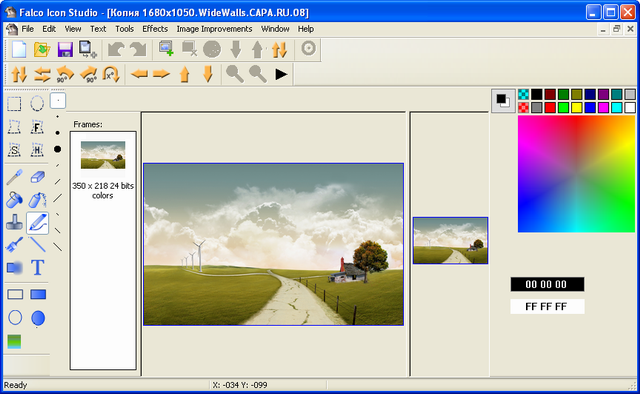

        To know more about functionality of the editor, go to Falco Icon Studio online help.


Price:

Freeware

Size:

14.8 Mb

Version:

7.1

Trial period:

Unlimited

Support OS:

Windows 98, Windows XP, Windows Vista, Windows 7


Download            Support


Falco Icon Studio is a powerful icon editor and cursor maker to edit icons, cursors and small web graphics, it`s useful for creating and extracting icons. It`s main advantage is the ability to create Windows XP compatible icons directly from images. Made with big amount of filters, masks, borders it allows to create original icons for entertainment or for job. It takes just few seconds to make new icon. You can edit icons in exe, dll or icl. A configurable special effect could be applied on each generated image. The program has a comfortable interface with two divided windows: original image and picture after making changes, instrument panels for drawing and etc. When creating icon You can select it`s parameters (size, color depth) and rich amount of instrument panel elements makes probable creating original pictures. It offers over 100-level Undo/Redo function, support for non-standard icons sizes. Falco Icon Studio allows write rotated text on icon, draw high-quality graphics. To make new icon just open image, set up colors, filters, rotation, masks or borders as You need and save it do disk. It takes a few minutes to create a new original icon with Falco Icon Studio. The program has over 16 different effects (Blur, Gray scale, Sharpen, Emboss, Mosaic, Contour, ), over 28 filters and noises (Image mode, Value filtering, Aperture size, Garmonic filters, Wiener filters, Butterworth filters, Gauss filter, Contrast/High Contrast filter), 34 original masks, 44 borders which accent the image. Manipulations with layers enlarge Your possibilities making intricate pictures or icons. Ergonomic position of windows and panels makes Your working maximum comfortable.

     Customer Testimonials:

     - I really enjoy using your program! Sincerely, Gregory Milos.
     - Merci Beaucoups for the program, it is now up and running and I have already been at it working in my larger files so that as part of their whole folder, the individual sub-folders are consecutive and set apart as to subject matter. As a small example, I have a French horse file dealing with the usage of horse drawn artillery "trains," versus those logistical "trains" drawn by mules this is contrasted with artillery "tains" drawn by tracteur and other logistical train set aside from the battery level supply column which was coprised of commandeered trucks taken from commercial sources. The two main folders overlap - so differentiating one sub-folder to the next and contrasting them per main folder can be done far more quickly because the icons designation the overall and specific are classed with icons that match the sub-folders common to each main folder.
     This is but a single example of what I plan to do with your program.
     Beautiful program,
     David Holmes


Add your question, opinion about product
Your name or nickname
Your email (will not show)
Message
 
Enter code
 
View Falco Icon Studio movie:


Falco software News

Spt 2, 2010:
Red Railway v.1.0.
New game - Red Railway has been launched!

Spt 2, 2010:
Falco Icon Studio v.7.1.
All tools are working with Selections now! Bug Fix version.

Spt 1, 2010:
Red Planet v.1.0.
New game - Red Planet has been launched!

Aug 30, 2010:
Falco Clever Ball v.1.0.
New game - Falco Clever Ball has been launched!

Aug 27, 2010:
Demon Slasher v.1.0.
New game - Demon Slasher has been launched!

Aug 26, 2010:
Falco Bautrix v.1.0.
New game - Falco Bautrix has been launched!

Aug 25, 2010:
Falco Image Studio v.6.1.
All tools are working with Selections now!

Aug 25, 2010:
Falco Texture Maker v.2.0.
CHM help added.

Aug 25, 2010:
Jumper Tree v.1.0.
New game - Jumper Tree has been launched!

Aug 24, 2010:
Falco GIF Animator v.2.5.
Optimizing is done.

Aug 24, 2010:
Forest Life v.1.0.
New game - Forest Life has been launched!

Aug 18, 2010:
Falco Billiard v.1.0.
New game - Falco Billiard has been launched!

Aug 17, 2010:
Falco Keyword v.1.0.
New game - Falco Keyword has been launched!

Aug 9, 2010:
Flaming Ball v.2.0.
management by mouse, dynamics improved expence of the ball speed and the chance outburst bonuses, special effects were improved, bugfixes, the game won a 1 place in the arkanoid competition among indie developers.

Aug 9, 2010:
Falco Pacmania v.1.0.
New game - Falco Pacmania has been launched!

Aug 5, 2010:
Falco Video v.1.8.
New films added. Searching was improved.

Jul 29, 2010:
Falco Texture Maker v.1.0.
New program has been launched - Falco Texture Maker.

Jul 20, 2010:
Falco Icon Studio v.7.0.
Neon Effect was added.

Jul 16, 2010:
Falco Image Studio v.6.0.
Neon Effect was added.

Jul 14, 2010:
Falco GIF Animator v.2.4.
Neon Effect + Bugs fixed version.

Jul 13, 2010:
Flaming Ball v.1.0.
New game - Flaming Ball has been launched!

Jul 8, 2010:
Falco Auto Image v.5.2.
Neon Effect added.

Jul 6, 2010:
Falco Icon Studio v.6.9.
Uploading to External Server is perfect now.

Jul 6, 2010:
Falco Image Studio v.5.8.
Uploading to External Server is perfect now.

Jul 6, 2010:
Falco Xonix v.1.0.
Falco Xonix has been launched.

Jun 30, 2010:
Falco Pinball v.1.0.
Falco Pinball - new game!

Jun 28, 2010:
Falco GIF Animator v.2.3.
Uploading to External Server improved.

Jun 28, 2010:
Orange Fun v.1.0.1
Resubmit.

Jun 28, 2010:
Industrial Ball v.1.2.1
Resubmit.

Jun 25, 2010:
Graph Converter Lite v.1.0.
New program - Graph Converter Lite.

Jun 23, 2010:
Falco Fire v.2.1.
New update.

Jun 23, 2010:
Falco Crushes v.1.0.
Falco Crushes - 3D Race simulator has been launched!

Jun 23, 2010:
Falco Blood v.1.0.
New game - Falco Blood has been launched.

Jun 23, 2010:
Falco Auto Image v.5.1.
Uploading improved.

Jun 22, 2010:
Music Hero v.1.1
Small updates.

Jun 21, 2010:
Falco Registry Doctor v.1.2.1
Small changes.

Jun 21, 2010:
Falco Video v.1.7.1
New films added.

Jun 16, 2010:
Falco Image Studio v.5.7.
Whirl & Pinch Effects added.

Jun 14, 2010:
Falco Icon Studio v.6.8.
Whirl & Pinch Effects added. Converting of Palette is perfect.

Jun 08, 2010:
Falco GIF Animator v.2.2.
Whirl & Pinch added. Deeply improved.

Jun 07, 2010:
Space Duel v.1.0.
New game - Space Duel has been launched.

Jun 07, 2010:
Falco Checkers v.2.3.
Small changes.

Jun 04, 2010:
Falco Auto Image v.5.0.
Soft Glow and Whirl&Pinch effects added.

Jun 03, 2010:
Falco Video v.1.7.
Interface was improved. New films added.

Jun 03, 2010:
Falco Chess v.4.7.
Minor changes.

May 31, 2010:
Falco Image Studio v.5.6.
Soft Glow effect was added.

May 31, 2010:
Falco Icon Studio v.6.7.
Soft Glow effect was added.

May 25, 2010:
Falco GIF Animator v.2.1.
Soft Glow Effect added.

May 19, 2010:
Falco Auto Image v.4.9.
Advanced Emboss added. Interface improvements.

May 17, 2010:
Falco Lines v.1.0.
New game - Falco Lines has been launched.

May 17, 2010:
Falco Image Studio v.5.5.
3 new effects added.

May 15, 2010:
Falco Video v.1.6.
New movies were added to base.

May 11, 2010:
Falco Icon Studio v.6.6.
Advanced Emboss effect was added.

May 11, 2010:
Falco Icon Studio v.6.6.
Advanced Emboss effect was added.

May 11, 2010:
Orange Fun v.1.0.
New game - Orange Fun has been launched.

May 10, 2010:
XoloX v.1.0.
New game - XoloX has been launched.

May 5, 2010:
Sea Attack v.1.0.
New game - Sea Attack has been launched.

May 4, 2010:
Industrial Ball v.1.2.
New game: Industrial Ball.

May 3, 2010:
Falco GIF Animator v.2.0.
Van Gogh, Cubism, Advanced Emboss Effects were added.

May 2, 2010:
Falco Image Studio v.5.4.
Bug fix version.

Apr 28, 2010:
Falco Auto Image v.4.8.
Van Gogh, Cubism effects added.

Apr 27, 2010:
Falco Chess v.4.6.
New version.

Apr 27, 2010:
Falco Video v.1.5.
New movies were added.

Apr 19, 2010:
Falco Icon Studio v.6.5.
Cubism, Erode, Cartoon effects were added.

Apr 14, 2010:
Falco GIF Animator v.1.9.
Wind effect added.

Apr 13, 2010:
Falco Corners v.1.3.
Interface improvements.

Apr 13, 2010:
Falco Molecule v.1.6.
Bugs fixed version.

Apr 13, 2010:
Falco Calculator v.2.7.
Small improvements.

Apr 12, 2010:
Falco Auto Image v.4.7.
Red EYE Removal & Wind effects added.

Apr 12, 2010:
Falco Manager v.2.0.
Sending File added.

Apr 08, 2010:
Falco Registry Doctor v.1.2.
Small changes.

Home || Downloads || Order || Support Copyright © 2007-2010 Falco Software Company. All rights reserved. Offshore Programming Partners: видео каталог фильмов, freeware game download,
free icon maker, free gif animator, image processing, free chess download, free photo editor, tank wars games downloads
Money off voucher codes . Gadget news